Standby List in Dental4Windows

The Standby List holds all patients who are waiting for an appointment time to become vacant. These patients can be added directly to the Standby list or from an existing appointment.
Standby List Column Explanation
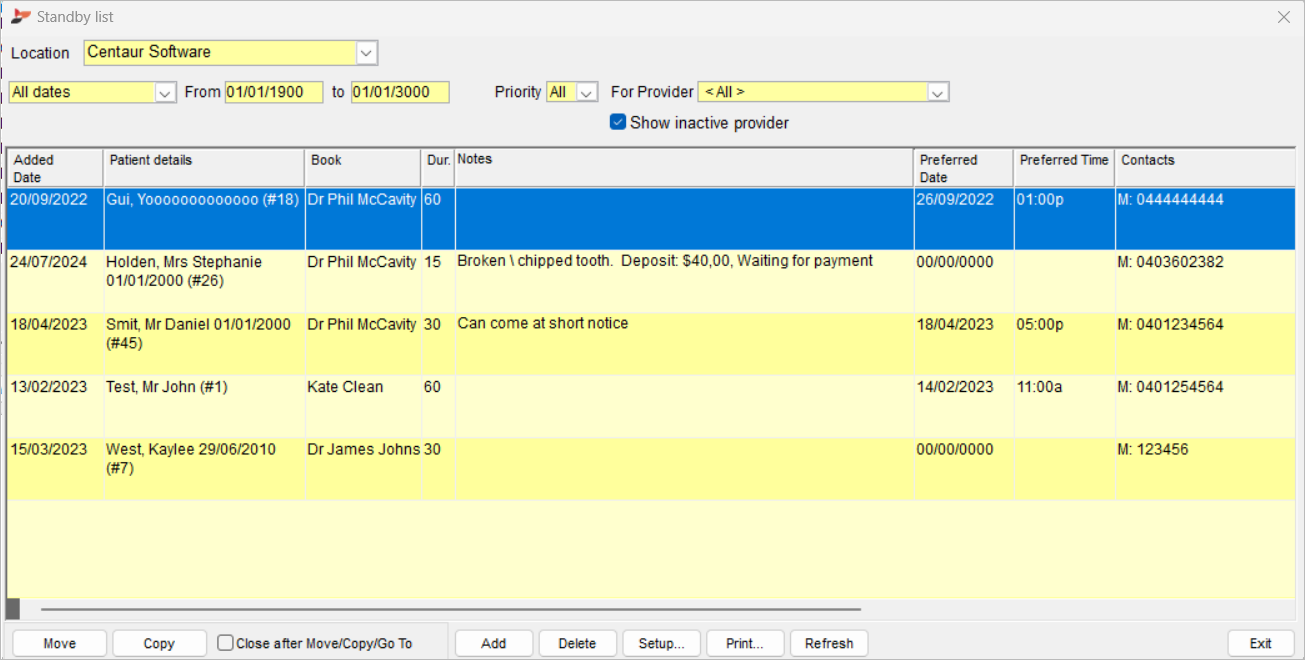
- Added Date: The date the patient was placed on the list
- Preferred Date: The preferred date of the patient
- Patient Details: Name, DOB and Card Number
- Prior.: Appointment priority, at the discretion of the practice
- Book: The appointment book to schedule the patient in
- Dur.: The required duration of the appointment
- Notes: Additional information about the booking
- Preferred Time: The preferred time of the patient
- Contacts: The patients contact numbers
- Class: The appointment class
- Next Appointment: The next appointment for this patient (if any)
- For Provider: The Provider to schedule the appointment for
- Appointed By: The employee who placed the patient on the Standby List
- Location: Only visible to multi-location users; the location to schedule the patient in
Please note, you can sort each column in ascending or descending order by clicking on the column name.
Add Patient to Standby List
There are multiple ways to add a patient to the Standby List.
Add Directly to Standby List
- Go to the Appointment Book
- Options menu > Standby List / Standby List icon
- Click Add
- Find the patient using the find feature
- Click OK
- Enter details relating to the appointment this patient is waiting for
- Click Exit
Add from Existing Appointment
If moving an existing appointment to the Standby List, information from that appointment will automatically populate the columns.
Existing appointments can either be copied or moved to the Standby List.
- Copy: Generally used when the existing appointment will remain and the patient will go on standby for something sooner if possible.
- Move: Generally used when the existing appointment will not proceed and the patient will go on standby for another date and time.
- Go to the Appointment Book
- Right click on the relevant appointment > Copy/Move to Standby List
- To open the Standby List go to Options menu > Standby List / Standby List icon