Sterilisation & Autoclave Reports in Dental4Windows

Listed below are the reports available to track autoclave loads and packs used on patients.
Autoclaved Works
This report will show what autoclave cycles have been processed and packs included in those cycles for a defined period.
Run the Report
- Go to Location Management > Sterilisation tab
- In the Reports menu, select Autoclaved Works
- Select period for report
- Location: Select location (if applicable)
- Active: Tick to show active autoclaves only
- Autoclaves: Select Autoclaves
- Click OK
Report Details
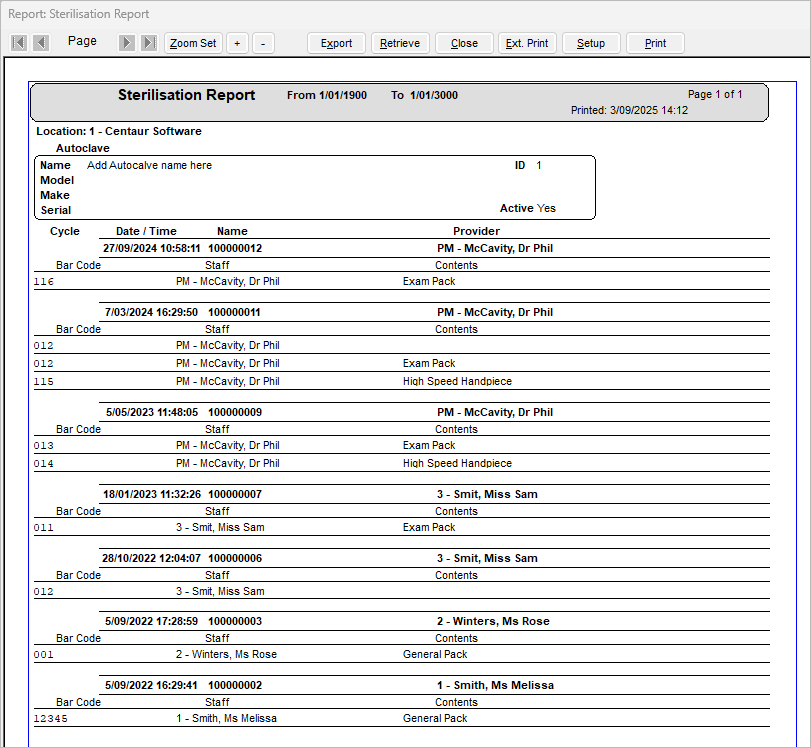
Cycle: Autoclave cycle ID number
Date / Time: Date and time cycle was processed
Name and Provider: Name of staff member that has entered cycle information
Barcode: Barcode number of pack
Contents: Contents of pack
Autoclave Cycles - Packs used on Patients
This report shows the details of packs used on patients for selected autoclave cycle.
Run the Report
- Go to Location Management > Sterilisation tab
- Highlight desired Autoclave Cycle
- Go to Reports menu > Autoclave Cycle - Packs used on Patients
Report Details
Bar Code: Barcode number of pack
Date used: Date pack was scanned into patients records
Patient: Patients name and file number pack was scanned to
Contact: Phone number of patient
Provider: Provider of record
Contents: Contents of pack